


IObit Uninstaller 15 is a perfect uninstall tool and a powerful utility compared to Windows’ default or built-in uninstaller.
Contents [show]
However, the system’s built-in uninstaller doesn’t always remove a program’s traces. Luckily, third-party software can help.
Third-party programs’ major benefit is that they try to take control of the uninstallation process and remove any leftovers that the official uninstaller missed.
Aside from that, these programs usually have more advanced options than the standard Windows Uninstaller.
For instance, third-party apps can monitor new software installations and build a system backup before they start. Should the newly installed program cause issues, this feature allows you to roll back.
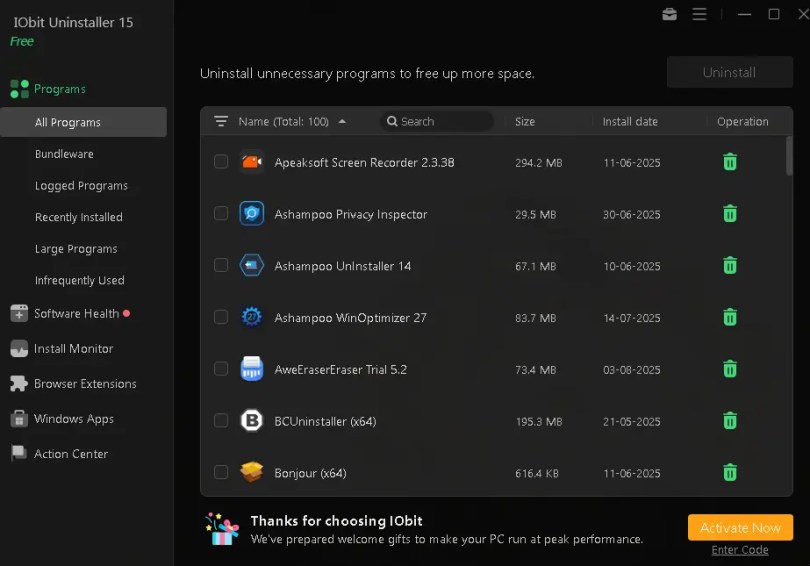
It removes leftovers and unnecessary programs, including Windows Apps, Universal Windows Platform (UWP) apps, and malicious/ad plugins.
IObit Uninstaller 15 has also improved the Software Health feature. It lets you manage software permissions, stop pop-up notifications, delete unnecessary setup files, and uninstall malicious software and browser extensions with just one click.

Many Windows users have unknowingly experienced strange software or even adware and bundleware.
While browsing online, users might unknowingly allow advertorial websites to show notifications on their browsers. Dealing with invasive pop-ups and spam messages can become tiresome.
To address these issues, users can utilise IObit’s Software Health feature. With just a few clicks, users can easily disable pop-up notifications in browsers and Windows apps.
Additionally, IObit has enhanced its uninstall features and broadened its software database. It provides quick access to scan and uninstall over 1,000 stubborn programs.
Users can now scan directories more accurately and troubleshoot unwanted programs on their PC.
Force Uninstall+ assists in removing software or files that are difficult to delete normally.
Furthermore, the improved Install Monitor identifies and logs more items during installation (including startup items) for future complete uninstallation.
IObit Uninstaller includes features like Bundleware, Stubborn Programs Remover, Force Uninstall, Install Monitor, and Software Health.

Run the installer, avoid IObit’s unwanted software, and complete the installation process.
Launch the app, then click “Enter Code” on the main window (below the Activate Now button), and enter the license code below.

Contents [show]
Why is it preferable to use a separate uninstaller instead of Windows’ built-in option?
Windows comes with a built-in uninstaller you can use to uninstall programs from your computer.However, the system’s built-in uninstaller doesn’t always remove a program’s traces. Luckily, third-party software can help.
Third-party programs’ major benefit is that they try to take control of the uninstallation process and remove any leftovers that the official uninstaller missed.
Aside from that, these programs usually have more advanced options than the standard Windows Uninstaller.
For instance, third-party apps can monitor new software installations and build a system backup before they start. Should the newly installed program cause issues, this feature allows you to roll back.
About IObit Uninstaller 15:
This uninstaller is for Windows users who want a clean PC and a safe online browsing experience.It removes leftovers and unnecessary programs, including Windows Apps, Universal Windows Platform (UWP) apps, and malicious/ad plugins.
IObit Uninstaller 15 has also improved the Software Health feature. It lets you manage software permissions, stop pop-up notifications, delete unnecessary setup files, and uninstall malicious software and browser extensions with just one click.
Many Windows users have unknowingly experienced strange software or even adware and bundleware.
While browsing online, users might unknowingly allow advertorial websites to show notifications on their browsers. Dealing with invasive pop-ups and spam messages can become tiresome.
To address these issues, users can utilise IObit’s Software Health feature. With just a few clicks, users can easily disable pop-up notifications in browsers and Windows apps.
Additionally, IObit has enhanced its uninstall features and broadened its software database. It provides quick access to scan and uninstall over 1,000 stubborn programs.
Users can now scan directories more accurately and troubleshoot unwanted programs on their PC.
Force Uninstall+ assists in removing software or files that are difficult to delete normally.
Furthermore, the improved Install Monitor identifies and logs more items during installation (including startup items) for future complete uninstallation.
IObit Uninstaller includes features like Bundleware, Stubborn Programs Remover, Force Uninstall, Install Monitor, and Software Health.
What’s new in IObit Uninstaller 15:
- Improved uninstallation engine for quicker and more comprehensive program removal.
- Improved silent uninstallation features for a more automated process that requires no manual intervention.
- The Enlarged Stubborn Program database now supports the removal of over 4,000 stubborn programs.
- Enhanced software health for deeper residual cleaning and more precise detection of software’s impact on system performance.
- Support for ARM systems has been added.
- There are two skins available: dark and light.
- Available in 39 languages.
IObit Uninstaller 15 Pro Free License:
Download the installer from here: https://cdn.iobit.com/dl/iobituninstaller.exeRun the installer, avoid IObit’s unwanted software, and complete the installation process.
Launch the app, then click “Enter Code” on the main window (below the Activate Now button), and enter the license code below.
Note: This code provides a 6-month subscription until December 24, 2026.New Code: 381E1-0A930-B5713-AEBTE
Note: This code provides a Pro subscription until August 18, 2026.License Code 1: A790A-3C885-9CE56-693BE
Note: This code provides a Pro subscription until August 15, 2026.License Code 2: BD278-7F6C0-CA83D-565BE
Note: This code provides a Pro subscription until July 7, 2026.License Code 3: BAD33-DC553-BF7A4-579TE